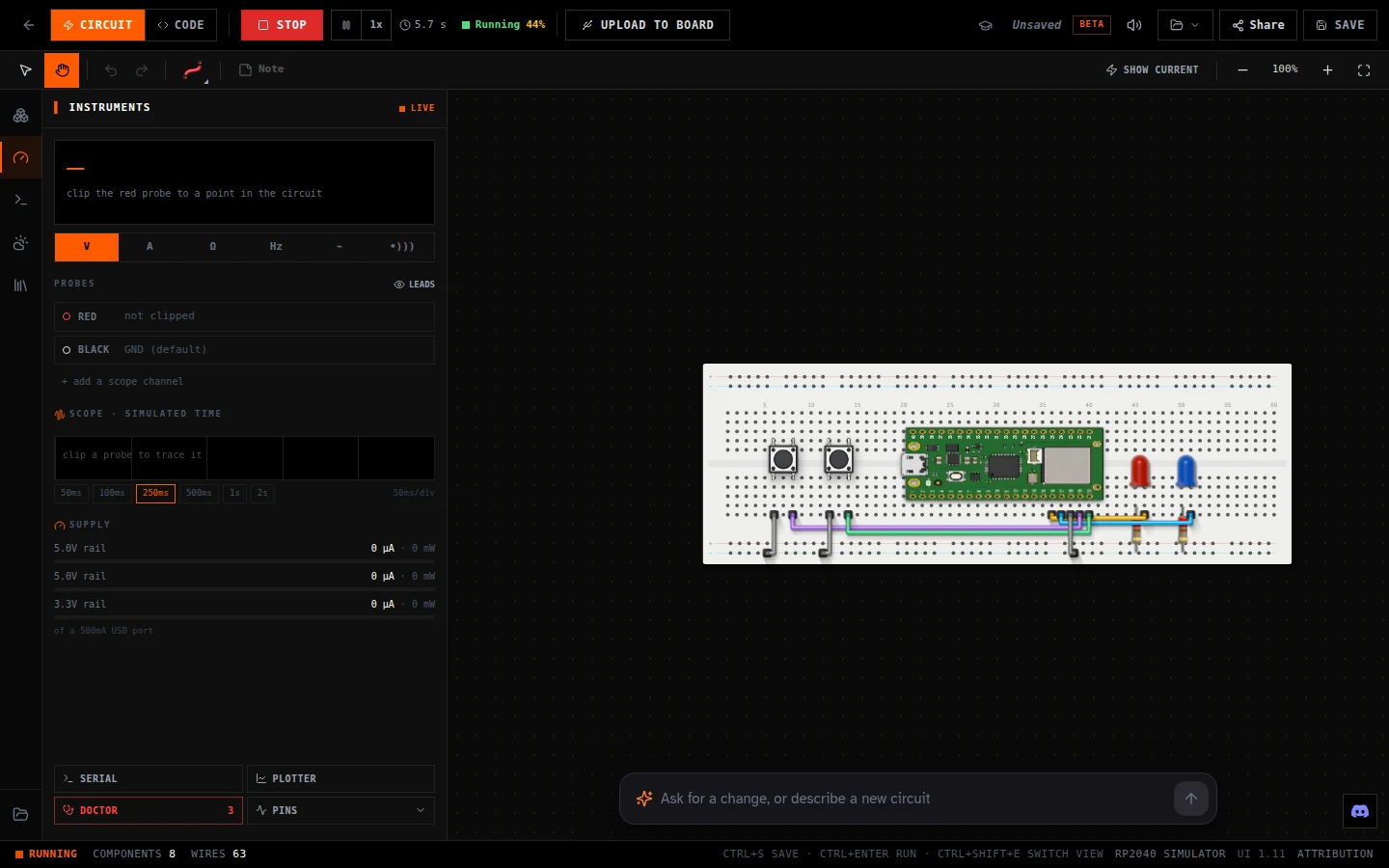
Raspberry Pi Pico simulator: real MicroPython in your browser
Updated
Write a few lines of Python, press Run, and an LED blinks on a Pico that only exists in your browser tab. Then wire in a button, a light sensor or a 4-digit display, and they behave the way they would on your desk.
There's nothing pretend about the Python. The simulator runs the real MicroPython firmware, the same file you'd put on a Pico, on an emulated RP2040 chip. So machine.Pin, PWM and ADC do exactly what the documentation says, and code that works here works on the board.
Open a Pico circuit · Simon, the memory game, in MicroPython on a Pico WH. Press Run. Free, on a computer or tablet.
Your first program
Open the simulator, pick the Pico WH, switch to Code and type this. It blinks the LED that's built into the board:
from machine import Pin
import time

led = Pin("LED", Pin.OUT)   # the built-in LED, on a real Pico WH too

while True:
    led.toggle()
time.sleep(0.5)print() writes to the Serial Monitor under the circuit, so you can watch your program think. Add print("on" if led.value() else "off") inside the loop and the monitor follows the LED.
What works
| MicroPython feature | In the simulator |
|---|---|
machine.Pin | Inputs and outputs on the GP pins, pull-ups, and pin interrupts |
machine.PWM | Fade LEDs and play tones on a buzzer |
machine.ADC | GP26, GP27 and GP28, plus the chip's own temperature sensor |
machine.I2C and SPI | For the parts that use them |
| Sensor modules | dht for the KY-015, onewire and ds18x20 for the KY-001, time_pulse_us for timing |
| Displays | The 4-digit display; not the OLED yet |
| Serial | print() to the Serial Monitor, and input() reads what you type there |
Read a sensor
The Pico's analog pins read a voltage as a number from 0 to 65535. Wire a light sensor module's signal pin to GP26 and print what it sees, then drag the light slider and watch the numbers move:
from machine import ADC
import time

light = ADC(26)   # GP26 is ADC0

while True:
    print(light.read_u16())   # 0 to 65535
time.sleep(0.5)The chip has a thermometer of its own on ADC 4. This turns its reading into degrees with the formula from Raspberry Pi's datasheet:
from machine import ADC
import time

sensor = ADC(4)

while True:
    volts = sensor.read_u16() * 3.3 / 65535
    celsius = 27 - (volts - 0.706) / 0.001721
    print(round(celsius, 1), "C")
time.sleep(1)Fade an LED with PWM
Every GP pin can do PWM. Wire an LED and a resistor to GP15 and this breathes it up from off to full:
from machine import Pin, PWM
import time

led = PWM(Pin(15))
led.freq(1000)

while True:
    for duty in range(0, 65536, 1024):
        led.duty_u16(duty)   # 0 is off, 65535 is full
time.sleep(0.01)The Pico's pins run at 3.3 V, not the HERO Board's 5 V, so the resistor you need for an LED is a little smaller. What resistor an LED needs works it out for both.
Good to know
- MicroPython only. The Pico in the simulator runs Python. For C++, use the Uno-compatible HERO Board.
- No OLED on the Pico yet. The 4-digit display works; the OLED screen works only on the HERO boards for now.
- Wi-Fi is part of the story lessons. The Neon Realm and Nebula Raiders lessons simulate the Pico's Wi-Fi on their own benches. In the free simulator,
import networkisn't available. - No
>>>prompt. Write your program in the editor and press Run;print()andinput()use the Serial Monitor. - Speed. The simulator keeps real time when your computer can, and slows down rather than skipping time when it can't. The status bar shows the pace.
From the simulator to a real Pico
Plug in a Pico WH that already has MicroPython on it and press Upload to Board. The simulator saves your program to the board as main.py, so it runs every time the Pico powers up. It works in Chrome and Edge. If your Pico is brand new, put MicroPython on it first: the Neon Realm kit's Day 0 lesson walks through it.
- Simon: the memory game with buttons and LEDs, from the Neon Realm kit.
- Neon Realm, Day 0: the first circuit of the Python course.
New to Python on a microcontroller? MicroPython vs Arduino C++ compares the two, and Uno or Pico helps you pick a first board.
Python Starter Kit: Neon Realm: A Raspberry Pi Pico WH, a breadboard and parts, with a story course that teaches MicroPython from blinking a light to Wi-Fi projects.
Questions
Is there a free Raspberry Pi Pico simulator?
Yes. This one is free and runs in your browser with no account. It runs the real MicroPython firmware on an emulated RP2040.
Can I write C++ for the Pico in the simulator?
Not on the Pico. It runs MicroPython here. For C++, use the simulator's HERO Board, which is Uno-compatible.
Does code from the simulator run on a real Pico?
Yes. It's the same MicroPython, so the same program runs on a Pico WH. Upload to Board saves it as main.py on a Pico that already has MicroPython.
Does the simulator do Wi-Fi?
Only inside the Neon Realm and Nebula Raiders story lessons, which simulate it on their own benches. In the free simulator, network isn't available.