C++ or MicroPython: which should you learn on a microcontroller?
Updated
Two languages run on the boards beginners learn with. C++ is what Uno-style boards like the HERO Board run, and what most microcontroller tutorials and libraries are written in. MicroPython is Python, slimmed down to fit on a chip like the one on the Raspberry Pi Pico.
Either one will teach you how code controls hardware. They feel very different to write, though, and they don't run on the same boards. Here is the same program in both, then the trade-offs that actually matter once you're at the desk.
The same program in both
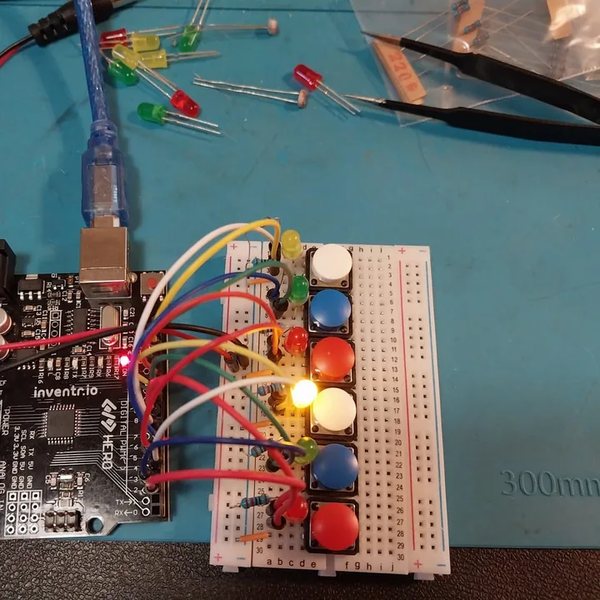
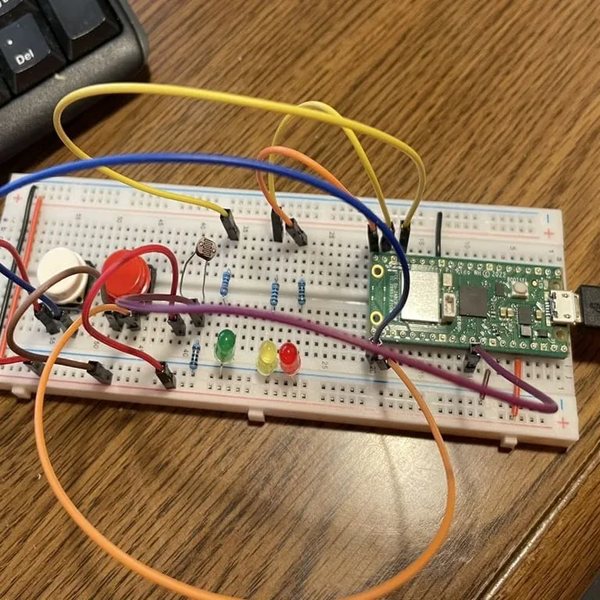
A push button lights an LED for as long as you hold it down. First in C++ on the HERO Board, from the Cogsworth City course. Then in MicroPython on a Raspberry Pi Pico WH, from Neon Realm.
const int buttonPin = 2;  // the push button
const int ledPin = 13;    // the LED

int buttonState = 0;

void setup() {
  pinMode(ledPin, OUTPUT);
  pinMode(buttonPin, INPUT);
}

void loop() {
  buttonState = digitalRead(buttonPin);

  if (buttonState == HIGH) {     // the pull-down makes HIGH mean "pressed"
    digitalWrite(ledPin, HIGH);
  } else {
    digitalWrite(ledPin, LOW);
  }
}from machine import Pin
led = Pin(15, Pin.OUT)
button = Pin(16, Pin.IN, Pin.PULL_DOWN)
while True:
if button.value() == 1:
led.on()
else:
led.off()Line for line they do the same job: set up a pin for the LED and a pin for the button, then check the button forever and switch the LED to match. Three differences already show:
- Shape. C++ wraps blocks in braces and ends each statement with a semicolon. Python uses indentation and no semicolons. Both are strict; they're strict about different things.
- Structure. C++ splits a program into
setup(), which runs once, andloop(), which runs forever. MicroPython runs top to bottom, so the forever part is awhile True:loop you write yourself. - Types. C++ says what kind of value every name holds:
const int buttonPin = 2;. Python just assigns:led = Pin(15, Pin.OUT).
A fourth difference hides in the wiring. The HERO Board version needs a 10 kΩ pull-down resistor on the breadboard to hold the button's pin LOW until it's pressed. The Pico's chip has pull-down resistors built in, so Pin.PULL_DOWN replaces the part. That one's the board, not the language: the ATmega328P only has built-in pull-ups. Expect a few of those when you switch.
Side by side
| To do this | C++ on the HERO Board | MicroPython on the Pico |
|---|---|---|
| Make a pin an output | pinMode(13, OUTPUT); | led = Pin(15, Pin.OUT) |
| Turn it on | digitalWrite(13, HIGH); | led.on() |
| Wait one second | delay(1000); | time.sleep(1) |
| Read a button | digitalRead(2) | button.value() |
| Read a light sensor | analogRead(A0): 0 to 1023 | adc.read_u16(): 0 to 65535 |
| Print a value | Serial.println(x); | print(x) |
| Repeat forever | void loop() { } | while True: |
| Group lines into a block | Braces { } | Indentation |
| Write a comment | // like this | # like this |
The light-sensor ranges differ because the HERO Board's analogRead() is 10-bit, while MicroPython's read_u16() always scales to 16 bits.
Where C++ wins
- Speed. C++ is compiled into the chip's own instructions before it runs. MicroPython reads and runs your program as it goes, which is many times slower. For lights and buttons you'll never notice. For fast, precisely timed signals you will.
- Libraries and tutorials. Almost every module you can buy comes with a C++ library for Uno-style boards, and most electronics tutorials are written in it. The Help Center's library pages, like U8g2 for OLED screens and the Keypad Library, are all C++.
- Small chips. C++ runs happily on the ATmega328P, with 2 KB of RAM. MicroPython needs far more memory than that, so it doesn't run on Uno-class boards at all.
- Mistakes caught early. The compiler checks the whole program before anything uploads. A missing semicolon or a misspelled name stops the upload with an error, instead of failing halfway through a run. Compiler errors explains the common ones.
- How computers really work. Types and memory are part of the language. On the ATmega328P an
intonly holds -32,768 to 32,767, which is why timing code keeps millis() in anunsigned long. A nuisance on day one; useful for good.
Where MicroPython wins
Instant feedback. Thonny, the editor the Pico courses use, gives you a prompt connected to the board. Type a line, press Enter, and it runs on the chip straight away, with no compiling and no upload. Wire an LED to GP15 and try it:
>>> from machine import Pin
>>> led = Pin(15, Pin.OUT)
>>> led.on()
>>> led.off()- Readable code. Fewer symbols and no types to declare, so a beginner spends less time on punctuation and more on the idea.
- Errors that point. When something goes wrong while it runs, MicroPython stops and prints the line number and what went wrong. A C++ program on a microcontroller usually just does the wrong thing, silently.
- It carries over. The Python you learn on a Pico is the Python people use on computers, in data work and in science classes. Variables, loops and functions transfer straight across.
- Wi-Fi projects. The Pico W and WH have Wi-Fi, and MicroPython makes a small web page from the board short work. Neon Realm's last project serves a temperature reading over Wi-Fi.
What stays the same
More than the syntax suggests. Pins as inputs and outputs, reading a sensor, a loop that runs forever, if and else, functions, a variable that keeps count: you learn each idea once. Switching languages later means learning new spelling for ideas you already own, which is far quicker than learning them the first time.
The electronics doesn't change at all. A resistor, an LED and a button behave the same whichever language switches them. The one real difference is the board's voltage, 5 V on the HERO Board and 3.3 V on the Pico, and What resistor do I need for an LED? shows what that does to an LED.
How to choose
- Choose C++ if you want to go deep into electronics: sensors, screens, modules, timing. It's the language of most tutorials and libraries, and Uno-compatible boards connect to 5 V hobby parts directly.
- Choose MicroPython if learning Python is the goal, you already know some, or your project needs Wi-Fi.
- Check your computer. The HERO Board courses run in Chrome or Edge on Windows, Mac or a Chromebook, and upload from the lesson page. Neon Realm uses Thonny on Windows, macOS or Linux; a Chromebook only runs it through ChromeOS's Linux environment, which school-managed Chromebooks often switch off.
Still torn? Write both programs above in the free browser simulator, which runs the HERO Board in C++ and the Pico in MicroPython. Whichever one you'd rather write a second program in is your answer. For the boards themselves side by side, see Uno-compatible or Raspberry Pi Pico.
Cogsworth City: HERO Starter Kit: Learn C++ on the HERO Board: twenty nights, a short film and a build each night, from the board's own light to buttons, light sensors and an RGB LED.
Python Starter Kit: Neon Realm: Learn MicroPython on a Raspberry Pi Pico WH: 20 lessons, from your first blinking light to a temperature page served over Wi-Fi.
Questions
Is Arduino code C or C++?
C++. The Arduino language is C++ with a small library of functions on top, like pinMode(), digitalWrite() and delay(), and a build step that fills in the parts you'd otherwise write yourself.
Can I run MicroPython on an Uno-compatible board?
No. MicroPython needs far more memory than the ATmega328P's 2 KB of RAM and 32 KB of flash. It runs on bigger chips, like the RP2040 on the Raspberry Pi Pico.
Is MicroPython real Python?
It's Python 3: the same syntax and most of the core language, with a smaller standard library and a machine module for pins and hardware. Code that sticks to the core language usually runs on both.
Which is easier for a complete beginner?
MicroPython reads more easily and gives faster feedback. C++ asks more of you up front and catches more mistakes before they run. Both make a fine first language, so choose by what you want to build.