KY-031 tap sensor (knock sensor) module: how it works, wiring and code
Updated
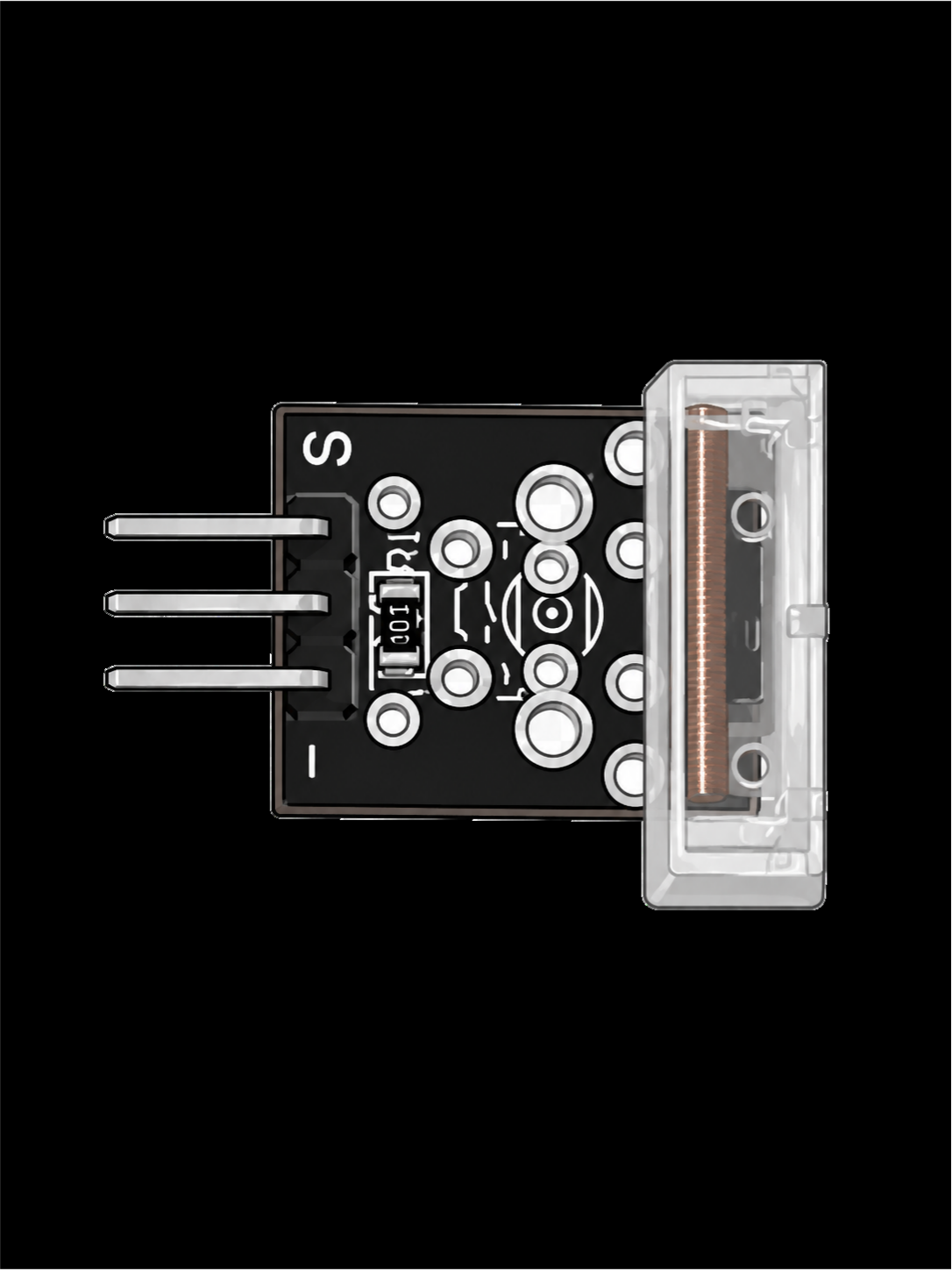
The KY-031 turns a tap of your finger into a signal. Look through the clear housing on its edge and you'll see a coiled spring. A sharp tap makes the spring swing and touch a contact, closing the circuit for an instant.
Counting those taps sounds easy. The course's own walkthrough shows why it isn't: tap hard and the spring keeps ringing, and one tap counts as two. Below is the course's counter, and the small change that fixes it.
How it works
It's a switch that a knock closes. There's no chip and no knob: just the spring contact, a resistor and three pins (S for signal, + in the middle, − for ground). Read it with digitalRead(). The signal changes only while the spring is touching, which is a brief moment, then returns to rest.
The instructor's bench notes from the walkthrough are worth knowing before you build anything with it. It works better on a flat, solid surface. Held in a hand, it shakes too much to be reliable. Fix it down before you trust it.
Wiring
| Module pin | HERO Board pin | What it carries |
|---|---|---|
| S | 3 | The signal |
| + (middle) | 5V | Power |
| − | GND | Ground |
Pin 3 matches the course sketch.
The course's tap counter
Rather than just lighting an LED, the course sketch counts. Each time the signal changes it prints on or off, and each time it goes HIGH it adds one to the count. The board's L LED lights on every fourth tap, using the % (remainder) operator.
const int tapPin = 3;    // the module's S pin
const int ledPin = 13;   // the board's L LED

int tapCount = 0;
int tapState = 0;
int lastState = 0;

void setup() {
  pinMode(tapPin, INPUT);
  pinMode(ledPin, OUTPUT);
  Serial.begin(9600);
}

void loop() {
  tapState = digitalRead(tapPin);

  if (tapState != lastState) {   // the signal changed
    if (tapState == HIGH) {
      tapCount++;
      Serial.println("on");
      Serial.print("number of taps: ");
      Serial.println(tapCount);
    } else {
      Serial.println("off");
    }
  }
  lastState = tapState;

  // light the LED on every fourth tap
  if (tapCount % 4 == 0) {
    digitalWrite(ledPin, HIGH);
  } else {
    digitalWrite(ledPin, LOW);
  }
}The idea that matters is lastState. The sketch doesn't count while the pin is HIGH, which would add thousands for every tap. It counts the moment the pin becomes HIGH. That's called edge detection, and it's how you count anything with a microcontroller: presses, turns, passes, beats.
Why one tap counts twice
In the walkthrough, gentle taps counted one each. Harder taps counted two, because the spring kept vibrating and touched the contact again. To your board, that second touch is a perfectly good tap. It's the same effect that makes a button register several presses, called bounce.
The fix is a lockout: after counting a tap, ignore the sensor for a short time while the spring settles. Here's the course's counter with one added check:
const int tapPin = 3;
const unsigned long lockoutMs = 150;  // ignore the spring's ringing

int tapCount = 0;
int lastState = 0;
unsigned long lastTapAt = 0;

void setup() {
  pinMode(tapPin, INPUT);
  Serial.begin(9600);
}

void loop() {
  int state = digitalRead(tapPin);
  if (state != lastState && state == HIGH) {
    if (millis() - lastTapAt > lockoutMs) {
      tapCount++;
      lastTapAt = millis();
      Serial.print("taps: ");
      Serial.println(tapCount);
    }
  }
  lastState = state;
}Start at 150 milliseconds. If hard taps still count twice, raise it. If quick double taps get lost, lower it. millis() is the board's running clock; the millis() article explains why it beats delay() here.
Tap sensor or shock sensor?
The KY-002 shock sensor is the other spring module in the kit. Its spring is enclosed in a round housing, and the course uses it to react to any movement at all. The KY-031's spring is in plain view, and the course uses it to count deliberate taps. Both read as digital, and both need edge detection and a lockout once you start counting. If the question is which way up something is, rather than whether it was hit, see the KY-017 and KY-020 tilt switches.
What to build with it
- A secret knock lock. Record the time between taps with
millis()and compare it with a stored rhythm. Light a green LED if it matches, red if it doesn't. - A tap-to-toggle lamp. One tap on the desk turns a light on, the next turns it off.
tapCount % 2tells you which. - A reaction game. Light an LED at a random moment and time how fast the player taps. random() picks the moment.
Common problems
- One tap counts as two or more. The spring is ringing. Add the lockout.
- Taps go missing. The loop is too slow, usually because of a
delay(), so the tap is over before the board looks. Keep the loop fast and time things withmillis(). - It triggers when you pick it up. It's sensitive to any shake. Fix the module to a flat, solid surface, as the walkthrough recommends.
- Nothing at all. Check S is in pin 3, then open the Serial Monitor at 9600 baud and look for the
onandofflines.
Watch it on the bench
The KY-031 walkthrough in the free SensorKit course wires the module to pin 3 of a HERO Board and taps it with the Serial Monitor open, so you can watch the count, and the double counts, happen. It runs under three minutes. Every other module is in the 37-in-1 sensor kit guide.
37-in-1 Sensor Kit: Both spring sensors, the KY-031 and the KY-002, with 35 more modules and the free SensorKit course.
30 Days Lost in Space: Never wired a breadboard? Start here: the HERO Board, a breadboard and parts, with filmed lessons from zero.
Questions
Is the KY-031 a tap sensor or a knock sensor?
Both names are used for the same module. The SensorKit course calls it the tap sensor; many shops sell it as a knock sensor. It's a spring contact that closes for an instant when the board is tapped.
Why does my KY-031 count one tap twice?
After a hard tap the spring keeps vibrating and touches the contact again. Ignore the sensor for about 150 milliseconds after each counted tap.
Can the KY-031 measure how hard I tap?
No. It's a switch, so it only says that a tap happened. A hard tap can make more than one contact, but that's the spring ringing, not a measure of force.
What's the difference between the KY-031 and the KY-002?
Both are spring switches. The KY-031's spring sits in a clear case and the course uses it to count taps; the KY-002's spring is enclosed, and the course uses it to react to any movement.