Play a melody on a passive buzzer
Updated
A passive buzzer has no tune of its own. Inside is a thin disc that flexes each time the pin switches, and your code decides how many times a second that happens. 523 times a second is the C above middle C; 1,047 is the C an octave higher. So a melody is just two lists of numbers: which notes, and how long each lasts.
This build is two wires and a short sketch, the one that passed its test in our simulator. Once it plays, you'll write your own tune, rests and all.
What you'll build and learn
The buzzer plays a rising six-note call (C, E, G, high C, G, high C), waits a second and a half, and plays it again. You'll learn:
- tone(): how the board plays a note in the background while your code moves on. tone() and noTone() has the details and a table of notes.
- Arrays: two lists kept in step, one of notes and one of lengths: arrays.
- for loops that walk a list from the first item to the last: loops.
- Passive and active buzzers, and why only one of them can play a tune: passive buzzer.
Run it: The buzzer melody, running · The finished build in the CraftingTable simulator: the same parts, wiring and code as this page.
Parts
| Part | How many | Notes |
|---|---|---|
| HERO Board | 1 | Uno-compatible, ATmega328P |
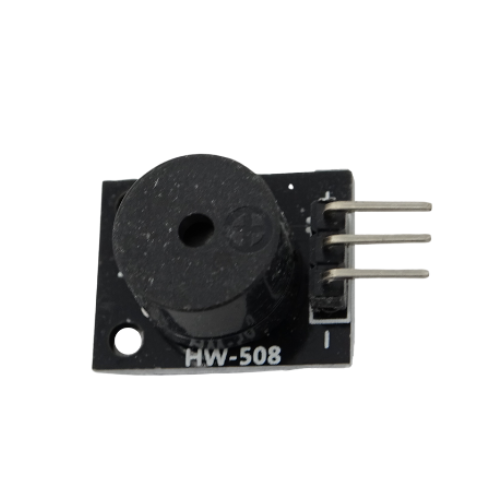
| Passive buzzer | 1 | Three pins, marked S and minus; the middle one stays empty |
| Breadboard | 1 | Optional: the buzzer can wire straight to the board |
| Jumper wires | 2 to 3 |
A passive buzzer comes in 30 Days Lost in Space and in Pandora's Box. The 37-in-1 Sensor Kit has one too, the KY-006, next to the KY-012, an active buzzer that can only beep at its own pitch.
Wiring
| Buzzer pin | HERO Board pin | Notes |
|---|---|---|
| S (signal) | D8 | Carries the note |
| Minus | GND | Ground |
| Middle pin | Nothing | Leave it unconnected |
Read the marks printed beside the buzzer's pins rather than going by position. No resistor is needed: a piezo buzzer draws almost no current. In the simulator example the buzzer sits on a breadboard with a jumper from D8 to the S pin's row and another from the minus pin's row to the GND rail; two jumpers straight to the board work just as well.
The code
No libraries to install: tone() is built into the Arduino language.
// Buzzer melody: the buzzer on D8 plays a short tune, then waits and plays it again.
const int BUZZER_PIN = 8;

const int NOTES[] = { 523, 659, 784, 1047, 784, 1047 };   // C5 E5 G5 C6 G5 C6, in hertz
const int LENGTHS[] = { 150, 150, 150, 300, 150, 450 };   // milliseconds
const int COUNT = 6;

void setup() {
  Serial.begin(9600);
}

void loop() {
  for (int i = 0; i < COUNT; i++) {
    tone(BUZZER_PIN, NOTES[i], LENGTHS[i]);
    delay(LENGTHS[i] + 40);   // a small gap between notes
  }
  Serial.println("played");
  delay(1500);
}How the code works
Two lists in step
NOTES holds six frequencies in hertz and LENGTHS holds six durations in milliseconds. Item 0 of one goes with item 0 of the other, so the first note is 523 Hz for 150 ms. COUNT says how many pairs there are; if you add notes, raise it to match, or the loop stops early.
tone() doesn't wait
tone(BUZZER_PIN, NOTES[i], LENGTHS[i]) starts the note and returns at once. One of the chip's hardware timers keeps the pin switching in the background and stops it when the time is up. That's why the next line is a delay(): without it, the loop would start all six notes within a fraction of a millisecond and you'd only hear the last. The extra 40 ms is a short silence between notes, so two notes of the same pitch don't blur into one long one.
Octaves
Look at the numbers: 523 and 1,047 are both C, an octave apart. Going up an octave doubles the frequency, and the same holds for every note. The Help Center's note table runs from C4 (262 Hz) to C5 (523 Hz); double any of them for the octave above, halve them for the one below.
Write your own tune
Look the notes up in the note table, write them into NOTES, give each a length in LENGTHS, and set COUNT. Rhythm comes from a few fixed lengths: 150 ms for a short note, 300 for a long one, 600 for a held one.
For a rest, put 0 in NOTES and skip the tone() call for it, so the loop only waits. Replace the for loop with this one:
for (int i = 0; i < COUNT; i++) {
  if (NOTES[i] > 0) {
    tone(BUZZER_PIN, NOTES[i], LENGTHS[i]);
  }
  delay(LENGTHS[i] + 40);
}
The Arduino IDE also ships an example called toneMelody (File, Examples, 02.Digital) with a pitches.h file that names every note, so you can write NOTE_C5 instead of 523.
Try it without parts
The free browser simulator plays the buzzer out loud through your computer's speakers. Wire a buzzer to a HERO Board, paste the sketch, press Run and you'll hear the tune, which makes it the quickest place to try a new melody before you upload it.
Make it yours
- Play on a keypress. Move the melody out of
loop()into its own function and call it when a button or a key is pressed. Day 12 of 30 Days Lost in Space goes further and turns the 16-button keypad into a 16-key piano. - One tempo for the whole tune. Multiply every length by a single number, say a
TEMPOof 1.0, and the whole melody speeds up or slows down when you change it. - Sound as feedback. A short high beep for yes and a low buzz for no is how real devices talk back. The keypad door lock is a good place to add it.
Common problems
- Only a click. The code switched the pin with
digitalWrite(). A passive buzzer only sings whentone()wiggles the pin for it. - A warble, or the same beep whatever the note. It's an active buzzer, which has its own oscillator. Use a passive one for melodies.
- Silence. The S pin isn't on the pin named in
BUZZER_PIN, or the minus pin isn't on GND. The buzzer makes no sound checklist covers the rest. - Low notes sound like ticking. Under about 100 Hz a small piezo clicks instead of singing. Its sweet spot is a few hundred hertz to a few thousand.
- An LED stops dimming while the tune plays.
tone()borrows Timer2, which also drives PWM on pins 3 and 11. Move the LED to pin 5, 6, 9 or 10.
30 Days Lost in Space: The HERO Board, this passive buzzer, a 16-button keypad and more, with filmed lessons that turn the keypad into a piano and the buzzer into an alarm.
37-in-1 Sensor Kit: Both kinds of buzzer, passive and active, among 37 modules in a latching case, with the free SensorKit course of filmed walkthroughs.
Questions
What's the difference between an active and a passive buzzer?
An active buzzer has its own oscillator: give it power and it beeps at one fixed pitch. A passive buzzer has none, so it only sounds when your code switches the pin with tone(), and that means it can play any note.
Why do I need delay() after tone()?
tone() starts the note and returns straight away, so the next tone() would replace it before you heard it. The delay holds the loop for the note's length, plus a short gap so notes don't run together.
Can a buzzer play two notes at once?
No. The board plays one tone at a time, and a new tone() call replaces the one that's playing.
How do I make the buzzer quieter?
A piezo's volume is basically fixed. Covering its hole softens it, and mounting it against something hollow makes it louder.