What is a microcontroller?
Updated
There are probably a dozen microcontrollers within reach of you right now: in the TV remote, the microwave, the car key, the thermostat. Each one is a whole computer squeezed onto a single chip, running one small program over and over for years.
That is also why they're the best way to learn electronics. You write a few lines of code, send them to the chip, and a light you wired yourself turns on. Here is what a microcontroller is, what's inside one, and how you program your first.
A whole computer on one chip
A laptop spreads its computer across many parts: a processor, separate memory, a drive, a graphics chip. A microcontroller puts the essentials inside one package:
- A processor that runs your program one instruction at a time.
- Flash memory that keeps your program when the power is off.
- RAM for the values your program is working with right now.
- Input and output pins that connect the chip to the world: they read buttons and sensors, and switch LEDs, buzzers and motors.
It runs no operating system. When power arrives it starts your program straight away, and it runs that one program until the power goes. That is exactly what you want inside a remote or a doorbell, and it makes a microcontroller simple enough to understand completely.
Microcontroller or microprocessor?
The two words get mixed up, but they describe different jobs.
| Microcontroller | Microprocessor | |
|---|---|---|
| What it is | Processor, memory and pins on one chip | A processor that needs separate memory and storage |
| Runs | One program you wrote, from power-on | An operating system and many programs |
| Starts in | A fraction of a second | Seconds, while the system boots |
| Power | Small enough for a coin cell or a USB port | Needs a proper power supply |
| Found in | Remotes, appliances, toys, the HERO Board, the Raspberry Pi Pico | Laptops, phones, the Raspberry Pi 4 and 5 |
What's on a microcontroller board
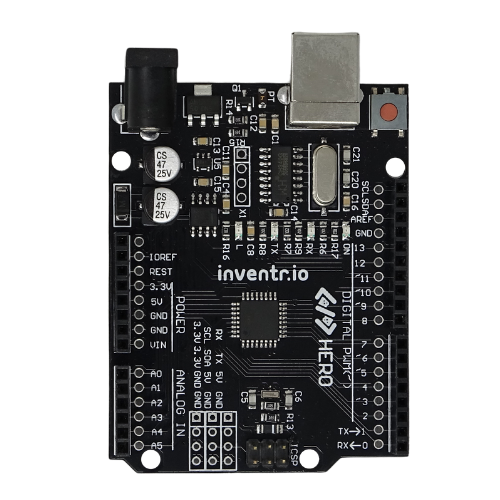
The chip on its own is hard to use, so you learn on a board that adds a USB port, a power regulator and labelled pin headers. The HERO Board is one of these. It's Uno-compatible and carries an ATmega328P, one of the most widely taught microcontrollers there is.
| HERO Board | |
|---|---|
| Microcontroller | ATmega328P |
| Clock speed | 16 MHz |
| Flash (your program) | 32 KB |
| RAM | 2 KB |
| Digital pins | 14, six of them with PWM |
| Analog inputs | 6 (A0 to A5) |
| Logic level | 5 V |
| Connection | USB, for programming and power |
The full pin map is in the HERO Board article in the Help Center.
32 KB sounds tiny, and it is: one photo on your phone is about a hundred times bigger. But a microcontroller program doesn't carry a screen, a browser or an operating system. A passcode lock with a keypad and a buzzer fits in a few kilobytes.
The HERO Board article maps every pin, and Digital I/O explains what reading and writing a pin means.
How you program one
- Write the code on your computer. Boards like the HERO Board use C++, written in the Arduino IDE or in a browser editor. Boards like the Raspberry Pi Pico are usually programmed in MicroPython.
- Compile and upload. The editor turns your code into instructions for the chip and sends them over the USB cable into its flash memory.
- It runs. The board restarts and runs your program. Unplug it, plug it into any USB power, and the same program starts again.
Every C++ program for these boards has the same two parts. setup() runs once when the board starts: you use it to say which pins are inputs and which are outputs. loop() runs forever after that: it's where your program reads sensors and makes decisions, thousands of times a second.
Your first program: blink a light
The traditional first program blinks the small LED that's built into the board on pin 13. No wiring needed.
void setup() {
  pinMode(13, OUTPUT);     // pin 13 drives the built-in LED
}

void loop() {
  digitalWrite(13, HIGH);  // 5 V on the pin: the LED lights
  delay(1000);             // wait 1000 milliseconds
  digitalWrite(13, LOW);   // 0 V: the LED goes out
  delay(1000);
}Change both 1000s to 100 and upload again: the LED flickers ten times faster. That small loop of change, upload, watch is how everything else gets built. You can try it without a board in the free browser simulator, which runs a real ATmega328P in your browser.
What people build with one
Once a few parts are wired to the pins, a microcontroller becomes whatever your code says it is. These are real builds from our courses, each on one HERO Board:
- A keypad passcode lock with a buzzer alarm.
- A battery gauge that reads a light sensor and changes colour as the light fades.
- A dial, built from a rotary encoder, that pilots a ship up through the water with a depth readout.
- A launch panel with three arming switches, a countdown and a status screen.
Each one starts with the same pieces as blink: set up the pins, then loop. Not sure which board to start with? Uno-compatible or Raspberry Pi Pico compares the two most common choices.
30 Days Lost in Space: The HERO Board and the parts for every build above, with filmed lessons that start from your first LED. No experience needed.
Questions
Is a Raspberry Pi a microcontroller?
The Raspberry Pi 4 and 5 are not: they're single-board computers with a microprocessor that runs Linux. The Raspberry Pi Pico is a microcontroller board, built around the RP2040 chip.
Is Arduino a microcontroller?
Arduino is a family of boards and the software used to program them. The boards carry a microcontroller: the Arduino Uno uses the ATmega328P, the same chip as the HERO Board.
What language do you program a microcontroller in?
Mostly C and C++. Boards like the Raspberry Pi Pico also run MicroPython, a version of Python made for microcontrollers.
Do I need to solder?
No. You plug parts and jumper wires into a solderless breadboard, and the board connects to your computer with a USB cable.