KY-015 temperature and humidity module (DHT11): wiring and code
Updated
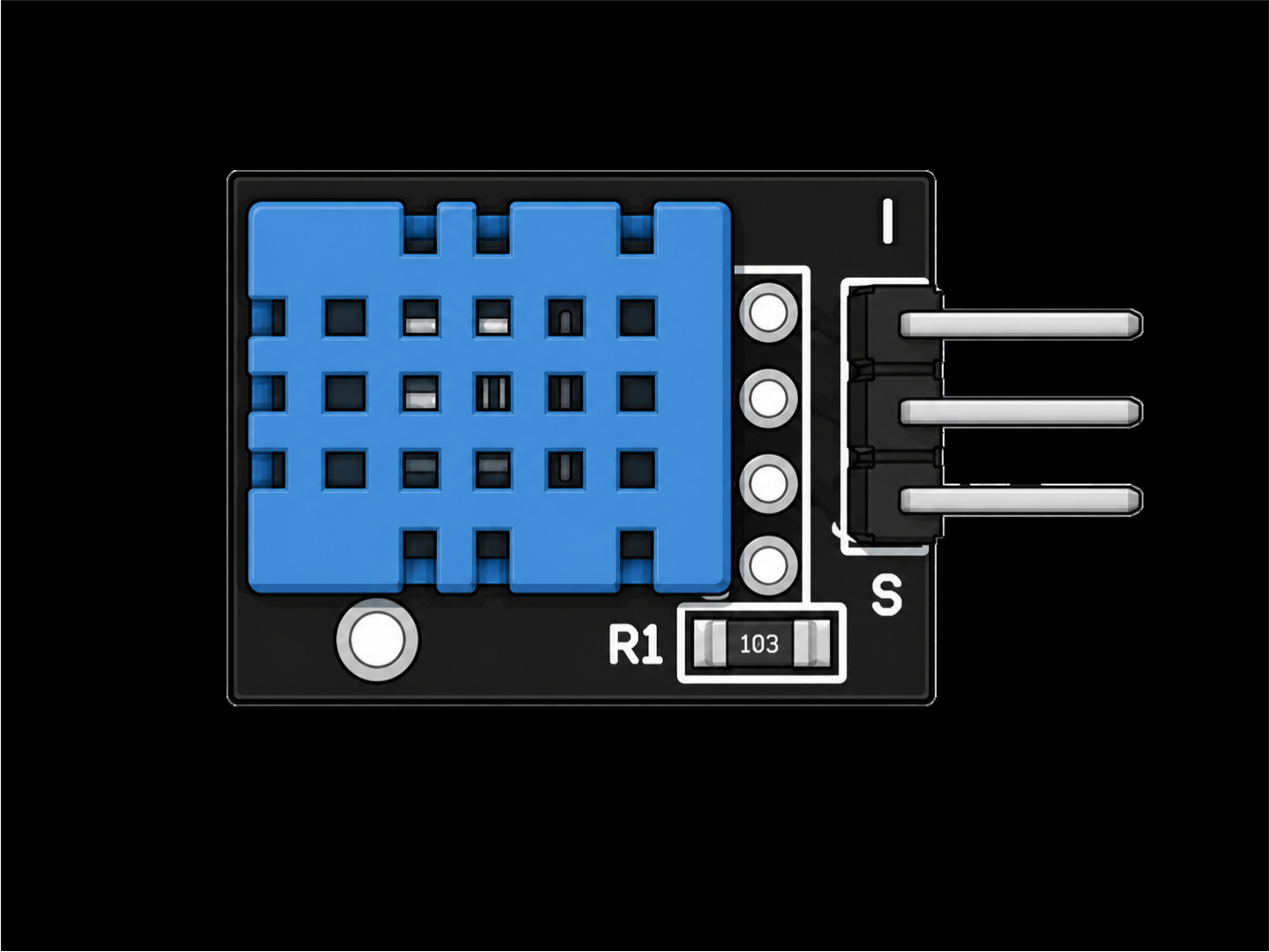
The KY-015 is the kit's humidity sensor. The blue box with the grille is a DHT11, which measures both the temperature and the relative humidity of the air and sends the two as data on one pin.
In the walkthrough the instructor calls it best for humidity, and that's the right instinct. As a thermometer it's slow and coarse, but nothing else in the case can tell you how damp the air is. Here's what it does well, where its limits are, and the code that reads it.
What's on the board
- The DHT11, in the blue housing. Behind the grille sit a humidity-sensing element and a thermistor, read by a small chip that sends the results to your board as data.
- A 10 kΩ resistor (marked 103). It's the pull-up the data line needs, so you don't add your own.
- A 3-pin header: S for data, the middle pin for 5 V, and minus for ground. The DHT11 itself has four legs, but one of them isn't connected to anything; the module wires up the three that matter.
How the DHT11 talks
The DHT11 uses a single-wire protocol of its own. It isn't the 1-Wire bus the KY-001 uses, and nothing happens until your board asks:
- Your board pulls the data line low for at least 18 milliseconds, then lets go.
- The DHT11 answers with a short preamble: low for about 80 microseconds, then high for 80.
- It sends 40 bits. Every bit starts with a 50-microsecond low, and the high that follows lasts about 27 microseconds for a 0 or 70 for a 1.
- Those 40 bits are five bytes: humidity, a decimal byte, temperature, another decimal byte, and a checksum, which is the sum of the first four cut to 8 bits.
Telling 27 microseconds from 70 is easy for code and impossible by hand, which is why everyone uses a library. The checksum lets the library throw away a reading that arrives garbled.
The DHT11 also has firm limits. It measures 0 to 50 °C and 20 to 90 % relative humidity, in whole numbers. It can't be asked more than about once a second, and the Adafruit library won't measure more than once every two seconds: ask sooner and it hands back its last answer. It's also slow to follow a change. Its datasheet gives response times of about 10 seconds for temperature and 6 for humidity, so a change that lasts shows in full after about half a minute.
Wiring the KY-015 to the HERO Board
| KY-015 pin | HERO Board | What it carries |
|---|---|---|
| S | Pin 7 | Data |
| Middle (+) | 5V | Power |
| Minus (-) | GND | Ground |
Pin 7 is the course's choice, and the walkthrough uses it too. Any digital pin works if you change DHT_PIN to match the wire.
The code
Install the DHT sensor library by Adafruit from the Library Manager (the course tested version 1.4.4). The Arduino IDE will offer to install Adafruit Unified Sensor along with it. Say yes, because the DHT library needs it. This is the course's sketch:
#include "DHT.h"

#define DHT_PIN 7
#define DHT_TYPE DHT11

DHT dht(DHT_PIN, DHT_TYPE);

void setup() {
  Serial.begin(115200);
  dht.begin();
}

void loop() {
  Serial.print("Temperature = ");
  Serial.println(dht.readTemperature());
  Serial.print("Humidity = ");
  Serial.println(dht.readHumidity());

  delay(1000);
}readTemperature() returns °C, and readTemperature(true) returns °F. Open the Serial Monitor at 115200 baud, not the usual 9600, to match Serial.begin(115200). In the walkthrough, blowing on the sensor sent the humidity climbing within seconds: your breath is warm and wet.
This sketch asks every second, but the library only measures every two, so every other line repeats the one before. That's harmless, and it's the first clue to the next fix.
Catch the failed reads
On the bench the instructor now and then got an impossible temperature, and filtered it out. With the current library a failed read comes back as nan, short for not a number, and Adafruit's own examples catch it with isnan(). This version adds that check and reads every two seconds, as often as the library really measures:
#include "DHT.h"

#define DHT_PIN 7
#define DHT_TYPE DHT11

DHT dht(DHT_PIN, DHT_TYPE);

void setup() {
  Serial.begin(115200);
  dht.begin();
}

void loop() {
  delay(2000);   // the library has nothing new any sooner

  float humidity = dht.readHumidity();
  float tempC = dht.readTemperature();

  if (isnan(humidity) || isnan(tempC)) {
    Serial.println("No reading: check the wiring and DHT_PIN");
    return;
  }

  Serial.print("Temperature = ");
  Serial.print(tempC);
  Serial.print(" C, Humidity = ");
  Serial.print(humidity);
  Serial.println(" %");
}KY-015, KY-001 or KY-028?
For humidity, the KY-015 is the only choice in the kit. For temperature alone, the KY-001 is the better instrument: it reads to a fraction of a degree, reaches well below freezing and follows a change faster. The KY-028 doesn't give you degrees at all; it's a switch that trips at a temperature you set with a screwdriver.
If you outgrow the DHT11, its bigger sibling the DHT22 covers a wider range in finer steps, and the same library reads it once you change DHT11 to DHT22.
What to build with it
- A habitat monitor. The walkthrough's own suggestion: it works well in small closed spaces like a reptile tank or a terrarium, where humidity matters as much as warmth.
- A desk weather station. Show both numbers on an OLED display; the walkthrough suggests a screen as the next step.
- A damp alarm. Sound the kit's KY-012 buzzer when the humidity passes a limit, in a bathroom, a basement or a cupboard.
- A breath trigger. Humidity jumps when you breathe on the sensor, which makes a surprisingly dependable "blow here" switch.
Common problems
nanevery time. The library got no answer. Check that S goes to the pin inDHT_PIN, the middle pin to 5V, and thatDHT_TYPEsays DHT11.- The same numbers over and over. You're asking faster than every two seconds and getting the library's saved reading. Slow the loop down.
- The temperature is a degree or two off. The DHT11 reports whole degrees and isn't built for precision. Use the KY-001 when the exact number matters.
- It reads warm. The sensor measures its own body. Keep it away from your hand and anything else that's warm.
- Humidity stops at 20 or 90. That's the edge of the DHT11's range, not the air.
Watch it
The KY-015 walkthrough is lesson 11 of the SensorKit course, and it's also the video on the 37-in-1 Sensor Kit's product page. Every module in the kit has the rest. The KY-015 is a part in the free browser simulator too, where the same DHT library reads an emulated sensor.
37-in-1 Sensor Kit: The KY-015 and 36 more modules in a latching case, with the free SensorKit course: 31 filmed walkthroughs and example code.
HERO Board: The Uno-compatible board the SensorKit walkthroughs are built around, with its USB cable.
Questions
Is the KY-015 a DHT11?
Yes. The blue sensor on it is a DHT11, and the module adds the 10 kΩ pull-up resistor its data line needs.
How often can I read the DHT11?
About once a second at most. The Adafruit DHT library measures no more than once every two seconds and returns its last reading in between.
Why does my DHT11 return nan?
nan means the library got no valid answer. Usually the data wire is on a different pin from DHT_PIN, the module has no power, or DHT_TYPE is wrong.
Can the KY-015 measure below freezing?
No. The DHT11 measures 0 to 50 °C. For colder places use the KY-001, whose DS18B20 reads down to -55 °C.